
Coinbase Commerce
Details on how Integral’s Coinbase Commerce integration works.
Step 1: Create a Commerce Account
Sign up for an account at commerce.coinbase.com.
Add an EVM compatible wallet address to receive crypto deposits.
Don’t have a wallet? Learn how to create one.
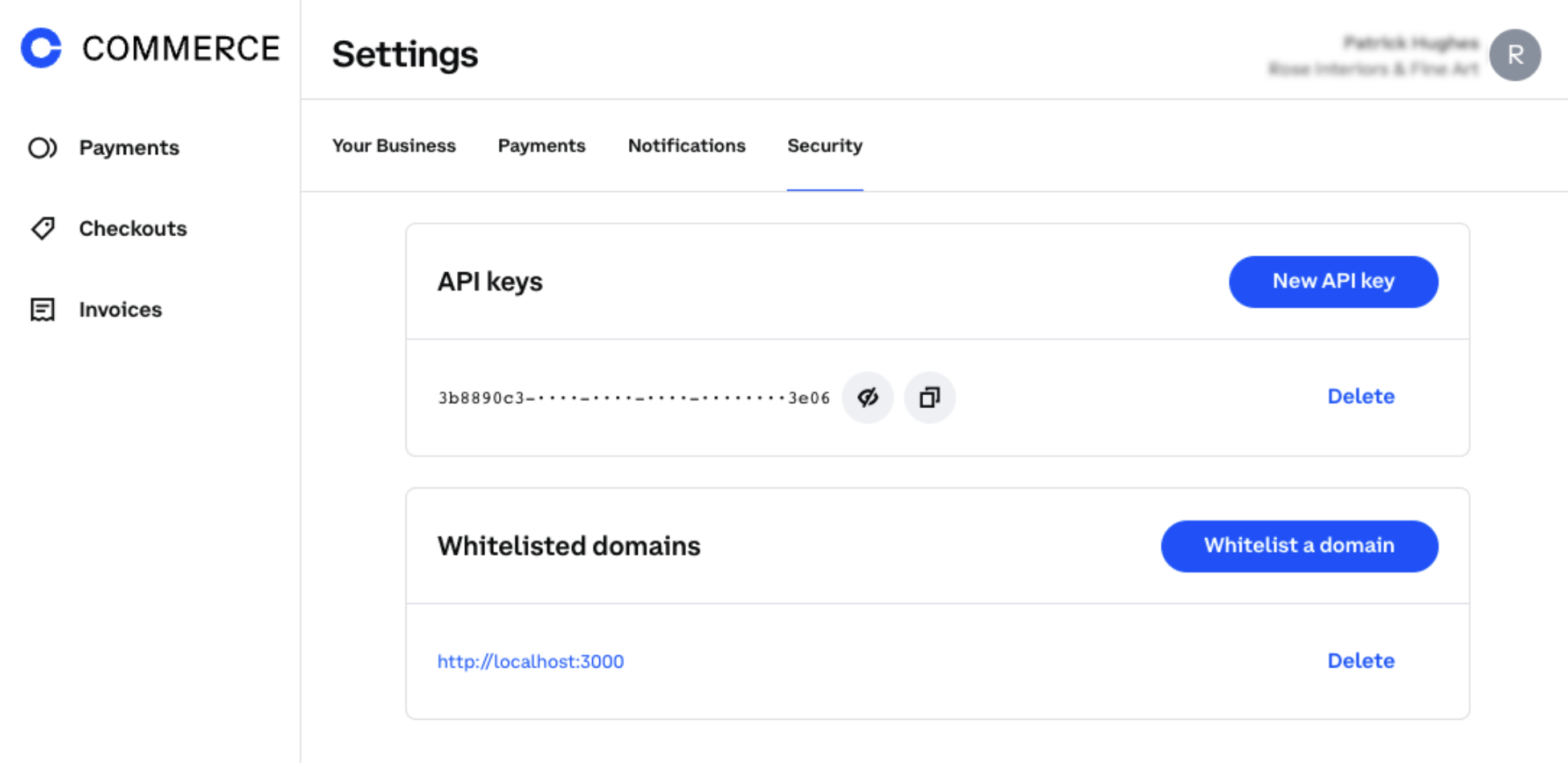
Step 2: Create an API Key
Log into Coinbase Commerce if not logged in.
Go to Settings > Security.
Click New API key and copy your key to the clipboard.
Integral uses a mix of both the Coinbase Commerce API and on-chain data from the custodian addresses to get complete data. Support only exists for Ethereum & Polygon.
Account Structure
Coinbase commerce’s account structure is fairly simple: only a single API key is required and there is one user/company per API key.
Integral uses an endpoint on the API (Merchant endpoint) that isn’t available in Coinbase Commerce’s standard documentation, but is needed to fetch the ethereum/polygon address that is assigned to the user. This is required to fetch on-chain information later on.
Specifications / unique features for integration
Withdrawals
Only supported for Ethereum and Polygon
For now, since Integral must use on-chain data directly, only withdrawal transactions from Ethereum and Polygon will be represented within integral.
Unsupported withdrawal chains: Bitcoin (BTC), Dogechain (DOGE), Litecoin & Bitcoin cash (BCH).
Have to use blockchain explorer APIs to fetch the information
We have to use the blockchain explorer of the specific chain to get the withdrawal transactions, because even though Coinbase Commerce’s API has an endpoint for withdrawals, it is currenctly not available for the customers (only used by the UI of coinbase commerce). We have contacted support in relation to that and they have confirmed that we don’t have access to that endpoint.
Refunds
Fetching of refunds
Since refunds can be done on old transactions, everytime we fetch the refunds to add a “withdrawal” transaction to the database, we have to go all the way back since inception of the account in case the user refunded a really old transaction.
Fee associated to refunds
Coinbase takes a processing fee on every deposit (seems like it’s also 1%), however if the user refunds the client, the fee is giving back to the client (so coinbase just doesn’t take their fees). To be noted that the user still needs to pay the transaction fee associated with the refund.
To best represent that, the payment that is represented by a deposit transaction in the database will have the net amount (so minus the coinbase processing fee) and if a refund happen, the withdrawal transaction associated with it will also have the net amount (even though the client receives the gross amount back) so that both transactions balance out.
Balance
Balance sync will run AFTER the transaction sync, to reduce the amount of call we make to the APIs. So the transaction sync will fetch everything (refunds, withdrawals, deposits) and then the balance sync will use our database’s information to calculate the account balances.