
Connect Your ERP
Connecting your ERP (QuickBooks, Xero, Netsuite) will import your Chart of Accounts and Customers/Vendors. This is an essential step to make the most use of the Integral platform.
Integral syncs your journal entries directly into your accounting system, eliminating the need to manually export and import entries. This keeps your general ledger current and audit-ready without duplicate data entry.
When synced, Integral automatically pushes journal entries to your ERP each time you categorize transactions and generate entries. The sync includes all debit and credit postings, maintaining full auditability and GL balance.
Integral supports three ERPs:
QuickBooks Online (QBO)
NetSuite
Xero
Before you connect
Successfully connecting your ERP requires three prerequisites in this order:
1. Transactions syncing. All your exchange, custodian, wallet, and bank accounts must be connected and live. Integral cannot generate journal entries without source transaction data.
2. Chart of Accounts mapped. Your Integral accounts must be mapped to your ERP's Chart of Accounts. Journal entries will post to the accounts you specify here; if mapping is incomplete, sync will fail or entries will post to wrong accounts.
3. Journal entry settings configured. Before syncing, configure how Integral generates entries: which accounts receive proceeds, fees, and gains/losses; whether to create entries per transaction or rolled up by date; memo formatting preferences.
This order prevents orphaned entries or sync errors. Connecting before these three steps complete will result in failed syncs or incorrect postings.
To import your Chart of Accounts, connect your ERP to Integral by following the steps in our Getting Started module. You can also connect to your ERP from the Integrations page. This step requires you to sign in to QuickBooks and Xero.
How to connect QuickBooks Online
In Integral, go to Settings → Integrations.
Select QuickBooks Online.
Click Authorize. You will be redirected to Intuit's login page.
Log in with your QuickBooks Online credentials.
Review the permissions Integral is requesting:
Read access to your Chart of Accounts
Write access to journal entries
Read access to entity information (company details, fiscal year)
Integral requests write access to journal entries only—it does not create, delete, or modify transactions, invoices, or other entity records.
Click Allow to grant permissions.
You will be returned to Integral. The connection is now active.
Once connected, Integral will push journal entries to QBO automatically on the sync schedule. Only entries are synced; individual transactions remain in Integral and do not appear in QBO.

Connecting to QuickBooks from the Integrations page. A similar flow exists for NetSuite & Xero.
How to connect Xero
Xero uses OAuth, similar to QuickBooks Online.
In Integral, go to Settings → Integrations.
Select Xero.
Click Authorize. You will be redirected to Xero's login page.
Log in with your Xero credentials.
Review the permissions Integral is requesting:
Read access to Chart of Accounts
Write access to journal entries
Read access to organization information
Integral requests write access to journal entries only—it does not create or modify invoices, bills, or other transactional records.
Click Allow to grant permissions.
You will be returned to Integral. The connection is now active.
Once connected, Integral will push journal entries to Xero automatically. Individual transactions remain in Integral and do not sync to Xero.
How to connect NetSuite
NetSuite requires manual credential entry rather than OAuth. You will need five pieces of information from your NetSuite account:
Account ID — Your NetSuite account number. Found in Setup → Company Information (labeled "Account ID" or sometimes "Company ID").
Consumer Key — Generated when you create an API integration.
Consumer Secret — Paired with the Consumer Key during API integration creation.
Token ID — Your user token for API access. Generated in Setup → Users/Roles → Access Tokens under your user record.
Token Secret — Paired with the Token ID.
To find or create these credentials:
In NetSuite, go to Setup → Integration → Manage Integrations (or Integrations → New).
Create a new integration record if one does not exist for Integral.
Copy the Consumer Key and Consumer Secret.
In Setup → Users/Roles, select your user, and go to the Access Tokens tab.
Create or locate your API token and copy the Token ID and Token Secret.
In Integral, go to Settings → Integrations → NetSuite.
Paste each credential into the corresponding field:
Account ID
Consumer Key
Consumer Secret
Token ID
Token Secret
Click Done.
Integral will validate the credentials immediately. If validation fails, verify that your account ID, keys, and tokens are copied exactly—whitespace or truncation will cause auth errors.
Once connected, Integral will push journal entries to NetSuite on the configured sync schedule.
What syncs and what doesn't
Synced: Journal entries only. Each entry includes:
Date — The date you configured for the entry (transaction date, posting date, or custom).
Debit and credit postings — One or more GL accounts debited and credited to balance the entry.
Account codes — The GL account codes mapped in your Integral Chart of Accounts.
Memo — A description you configured (e.g., transaction hash, date range, category).
Amount — In your organization's base currency.
Not synced:
Individual transactions (buys, sells, transfers, fees). These remain in Integral only.
Ledger activity or cash flow reports.
Categorization rules or tags.
User comments or internal notes.
The journal entry is the only record that moves from Integral to your ERP. Everything else stays in Integral for audit, reporting, and analysis.
Automatic sync frequency
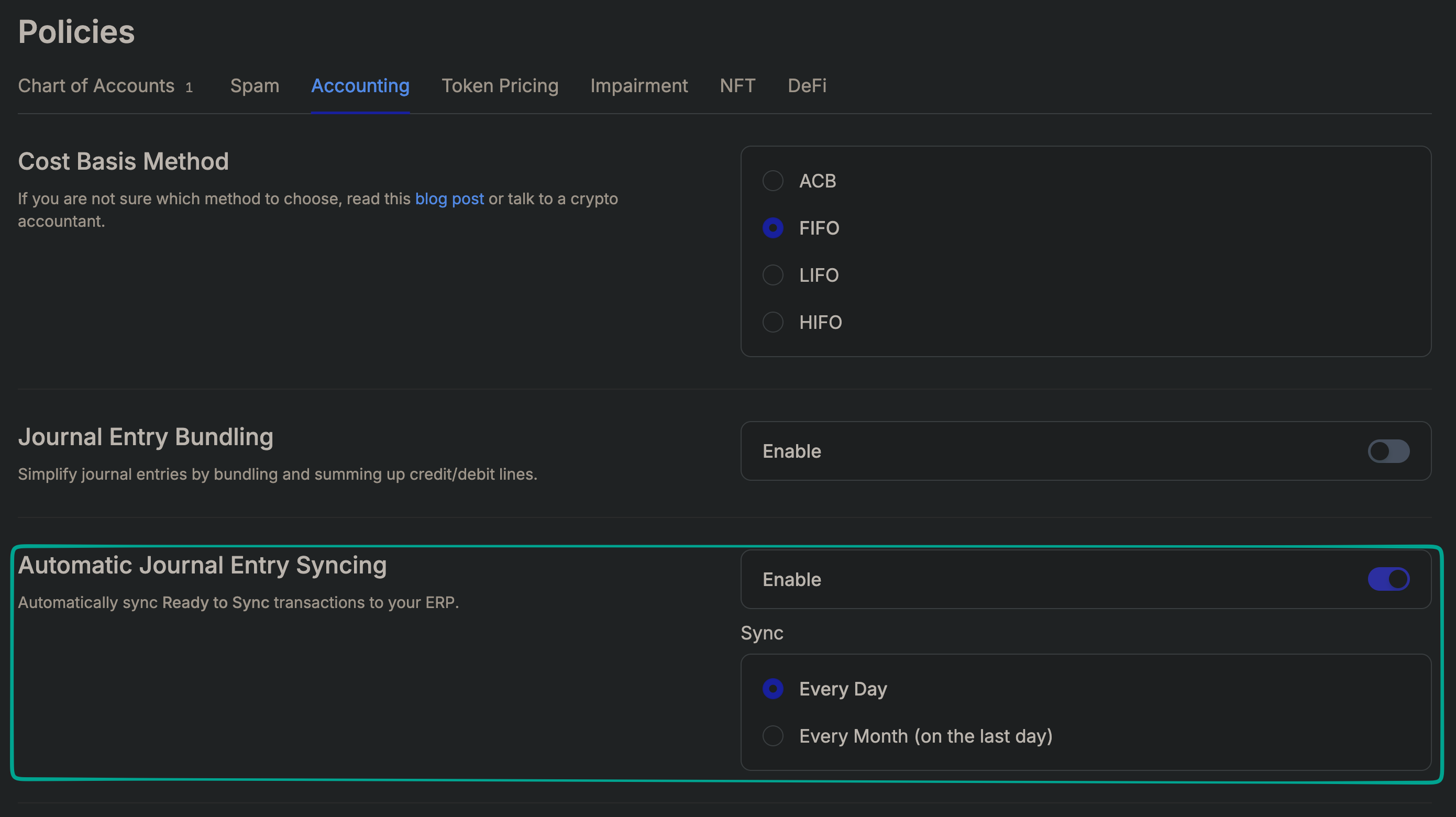
Navigate to the Policies page > Accounting tab and enable automatic syncing. Only two frequencies available are:
Every Day
Every month (Last day of the Month)
How to d the sync is working
After connecting your ERP, confirm that entries are posting correctly.
In QuickBooks Online:
Go to Accounting → Chart of Accounts.
Select the GL account you are posting entries to (e.g., your crypto proceeds account).
Go to the Transactions tab. You should see journal entry lines with the date and amount you configured in Integral.
Click into a journal entry to verify the debit/credit structure, memo, and linked accounts match your Integral settings.
In Xero:
Go to Business → General Ledger.
Select the account your entries post to.
You should see journal entries with the date, description, and amounts from Integral.
Click an entry to view the full debit/credit structure.
In NetSuite:
Go to Accounting → Transactions → Journal Entries.
Filter by date range or account to find your Integral-generated entries.
Click into an entry to verify the posting accounts, debit/credit amounts, and memo.
If entries are not appearing:
Confirm that your Chart of Accounts is fully mapped (no unmapped accounts in your entries).
Verify that your journal entry settings are configured.
Check that your sync is enabled and no errors are shown in Integral.
Disconnecting or reconnecting
To disconnect an ERP:
Go to Settings → Integrations.
Find the ERP (QuickBooks Online, NetSuite, or Xero).
Click Disconnect or Revoke.
Confirm the action.
What happens to historical data:
Journal entries already synced to your ERP remain in your accounting system. Disconnecting does not delete historical entries.
If you reconnect the same ERP later, Integral will resume pushing new entries. It does not re-sync old entries.
To reconnect, follow the connection steps for your ERP. You do not need to reconfigure Chart of Accounts mapping or journal entry settings; those persist across disconnects.
Troubleshooting
Auth token expired
Symptoms: Entries fail to sync; Integral shows an auth error.
Solution: Reconnect your ERP. For QBO and Xero, go to Settings → Integrations, find the ERP, and click Reauthorize. For NetSuite, update your Token ID and Token Secret if they have expired or been rotated, then click Update.
Account not mapped
Symptoms: Sync fails with an error about an unmapped account. Entries do not post.
Solution: Go to Settings → Chart of Accounts and verify that all accounts used in your journal entry rules are mapped to your ERP's GL. If an account is missing, add the mapping and retry the sync.
Duplicate journal entries
Symptoms: The same entry appears twice in your ERP.
Solution: This usually occurs if you manually import entries after Integral has synced them, or if a failed sync was retried. Check your ERP's journal entry log for duplicates by date, amount, and memo. Delete or reverse the duplicate entry. Then verify that your sync settings are correct and try again.
Currency mismatch
Symptoms: Entries post to the wrong currency account, or sync fails with a currency error.
Solution: Verify that your Integral organization's base currency matches your ERP's functional currency. If your organization has transactions in multiple currencies, ensure that your journal entry rules map each currency to the correct GL account in your ERP.
Sync fails with no specific error
Solution: Verify the following in order:
Your Chart of Accounts is fully mapped (no unmapped accounts).
Your journal entry settings are configured and active.
Your ERP connection credentials are still valid (token not expired, credentials not changed).
Your ERP user account has write access to journal entries.
If the error persists, contact support with the date and time of the failed sync attempt.
Don't use an ERP? Ask Integral to upload one of our default Chart of Accounts, or to import a custom one you already use.
Last updated: April 2026